Blog

WordPress website design

Blog

The Evolution of WordPress Content Creation Tools

A journey from Quicktags to the Gutenberg block editor.

Today, WordPress website design relies heavily on intuitive tools that allow businesses to manage and update their content without technical knowledge.

WordPress continues to evolve each year, offering users more convenient and intuitive ways to create content. Our WordPress developer, Daniel Vasser, takes a quick look back at how WordPress content creation tools have developed — from the first HTML buttons to today’s Gutenberg block-based editor. This story helps explain why WordPress has become the world’s most popular CMS and where content management is headed in the future.

What is a content creation tool?
A content creation tool is the place where a website’s content truly comes to life — text, images, blocks, elements, and layouts.
In the WordPress context, it refers to the interface where you can:

  • write and structure text;
  • add media;
  • organise sections;
  • design blocks and arrange elements;

It’s the tool that allows website editors to create content without writing any code.

 

—————————————————————————

Daniel Vasser
WordPress developer
From a simple blogging tool to a full CMS

WordPressi veebilehe kujundamine

WordPress is a CMS (Content Management System) that enables users to easily create and manage websites, blog posts, and other content. WordPress was launched in May 2003 with its first beta version, 0.71. Built on PHP and MySQL, its initial goal was to provide a user-friendly blogging platform for publishing articles and handling comments.

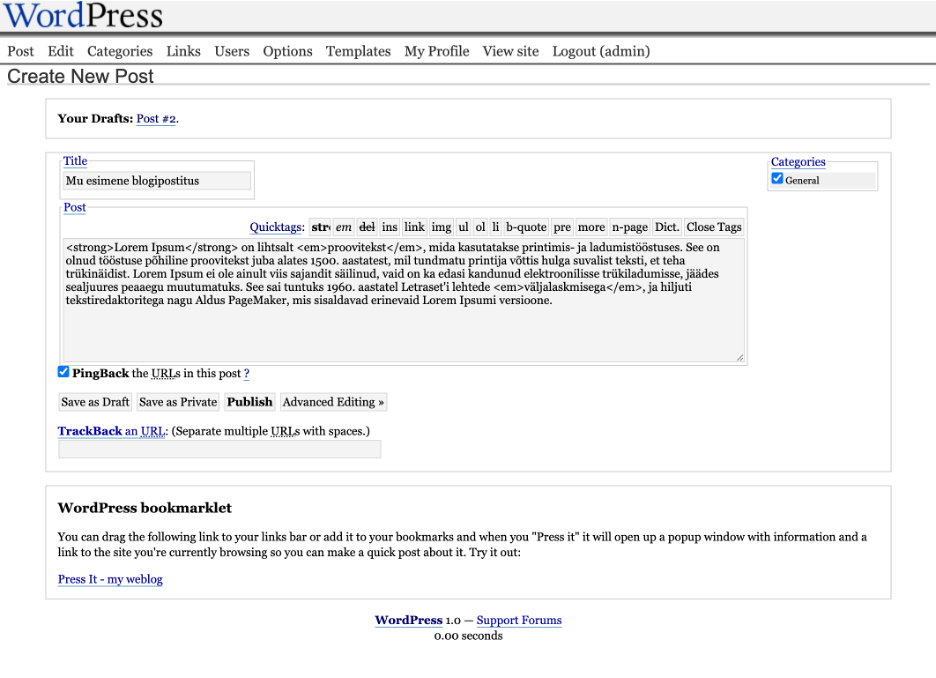
Early versions were minimalist — one content field and a lot of HTML. In 2004, WordPress introduced Quicktags, the first simplified editing tool that allowed users to insert HTML elements with a button click. For example:

  • Bold<strong>;
  • Italic<em>;
  • add links without manually writing HTML.

This was the first major step toward better user-friendliness. Although simple, Quicktags laid the foundation for the user-friendly workflows we now expect from modern WordPress website design.

TinyMCE — The Classic Editor That Shaped Early WordPress Website Design

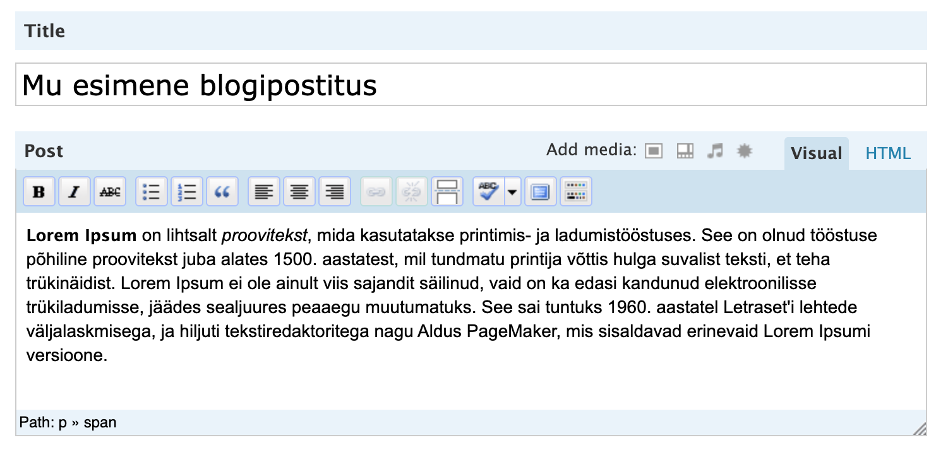
In 2005, WordPress 2.0 introduced a new WYSIWYG editor: TinyMCE. This was a turning point — TinyMCE made content creation accessible to everyone, even those with no HTML knowledge.

TinyMCE brought:

  • styling and formatting tools;
  • plugins supporting visual alignment and tables;
  • switching between HTML and Visual views.

TinyMCE remained the default WordPress editor until version 5.0 and is still available today via the Classic Editor plugin.

ACF: A new level of structured content

While WordPress originally provided only one content field, developers needed ways to create more complex, structured content — repeating sections, galleries, dynamic content blocks. This is where Advanced Custom Fields (ACF) came in.

ACF made it possible to:

  • add custom fields (text, images, repeaters, groups, etc.);
  • organise content in a structured way;
  • separate content creation from design logic.

Before block editors existed, ACF became incredibly popular for building flexible, component-like structures used in themes and templates.

For many years, TinyMCE defined how WordPress website design and content editing were done, making WordPress accessible to a much wider audience.

Page Builders — visual design before Gutenberg

Over the years, demand grew for visual tools that allowed non-technical users to design page layouts freely. This led to the rise of popular page builders:

  • WPBakery Page Builder;
  • Divi Builder;
  • Beaver Builder;
  • Elementor (which became the most widely used)

Page builders introduced:

  • real-time visual editing;
  • drag-and-drop layout control;
  • pre-made sections and widgets;
  • detailed layout settings without coding.

However, they also brought challenges — complex HTML markup, dependency on the builder, and migration issues.

Gutenberg — The Future Standard for Modern WordPress Website Design

Gutenberg represents a major shift in WordPress website design by turning every element into a flexible, customizable block. In late 2018, WordPress 5.0 introduced Gutenberg, a completely new concept for the editor. Every piece of content became a block, which can be rearranged, customised, and combined in limitless ways.

Adding and configuring Gutenberg blocks

Gutenberg is designed to be highly intuitive. Clicking the “+” icon opens the block library, where editors can choose the content type they want to add. After inserting a block, the right-hand panel displays configuration settings for that specific block.

WordPress website design

Main block categories:

  • Text: paragraph, heading, list, quote, etc.,
  • Media: image, gallery, video, file;
  • Design: columns, buttons, spacers, separators;
  • Widgets: icons, social media links, etc.;
  • Theme: post title, date, excerpt, featured imageteema;
  • Embeds: YouTube, Spotify, Twitter, and others via URL.

Gutenberg is now the central direction of WordPress development, offering a fully block-based editing experience without relying on additional plugins.

Page builders and ACF still remain important, especially for large or custom projects, but WordPress is clearly moving toward a unified block ecosystem.

Why We Build Modern WordPress Website Design Using Gutenberg?

We believe that a modern website should combine beautiful design with effortless content management. That’s why we design and develop websites using WordPress CMS and the Gutenberg block editor — making content updates clear, fast, and stress-free for our clients.

At ED Hotels, we create websites that use:

  • WordPress CMS;
  • the Gutenberg block system;
  • modern development standards.

At ED Hotels, we combine modern development standards with Gutenberg to create WordPress website design that is visually refined, easy to update, and future-proof.

OUR PORTFOLIO ASK PROPOSAL